Showing posts with label Mac Port. Show all posts

Thursday, March 06, 2008

Sorting Tables in a MediaWiki

I've noticed that a number of tables in the Wikipedia are sortable. Further research found that it is implemented through client side javascript, when a table has the class="sortable". It is available in MediaWiki 1.9 or later.


I have found adding the sorting to the OpenOffice.org Mac OS X Porting Roadmap really useful as you can now sort the table and easily see what is a high priority or already fixed. I wouldn't recommend it for full bug tracking. 

The next feature I'd like to see is row level editing of tables in the wiki, as I hate having to try and find the one or two rows in the table that I want to change.

If you would like to help the port by implementing one of the items on the road map, why not contact the MacPort team? Drop a mail to the mailing list mac@porting.openoffice.org (first subscribe by sending a mail to mac-subscribe@porting.openoffice.org. Or say drop by on IRC server irc.freenode.net on the channel #ooo_macport.

Sunday, November 25, 2007

The past 2 months

It has been a couple of months now since I've properly written a blog post. So here is a longish catchup post.


I have been busy doing agency work mostly in staff restaurants as a Kitchen Porter. I've even bumped into the Lead of the Marketing Project in our home town, rather than having to go to some OpenOffice.org conference. I did spend 3 weeks commuting by train (a novelty for me), to Stirling to work as a caretaker. Unfortunately the work is rather dull, though there are bills to be paid. Hopefully I'll get around to updating my CV and sending it off to relevant people to hopefully get a degree related job.


Now back to 2 months ago.
I managed to get up and do my Buildbot presentation at ooocon2007 without any breakfast. The presentation has been really useful, as I have received some very useful feedback from developers on what they want from the system.


Code writers are interested in seeing if their code breaks on some other platform as early as possible. They want this to be reliable, and ideally the same configuration as the officially released builds.
The QA project are looking for install sets for testing new code that is about to be introduced into the main code line. Again they ideally want to have the same configuration as the officially released builds.

At the moment the source code statistics aren't interesting enough for developers to want them. Also the basics don't currently work well enough.


I have finally got around to Geotagging my photos from this years OpenOffice.org conference in the past few days. As I have upgraded to Mac OS X 10.5, I found that my previous geotagging solution (GPSPhotoLinker) has stopped working as a library has stopped working due to a perl version mismatch. So I have headed to the command line with a perl script. gpsPhoto.pl seems to do the trick, though it is a pain to get the command line right as it isn't as easy to just drag a load of photos from iPhoto. I'm not upgrading to iLife 08, as there is no GPS tagging support. Leopard's Preview has a feature that allows you to go to a Google map of where the photo was taken. However, what I really want it to tell iPhoto: look in this folder for GPS traces, and geo tag all these photos automatically.

For future reference (as I was in mainland Europe with daylight saving the offset from UTC is minus 2 hours):

./gpsPhoto.pl --gpsdir 2007-09 --timeoffset -7200 --maxtimediff 7200 --overwrite-geotagged --dir /Users/shaunmcdonald/Pictures/iPhoto\ Library/Originals/2007/ooocon2007/

Photos from ooocon2007. I've also added the photos to Flickr with the ooocon2007 tag.

As many people have already seen. I am now the lead for the Mac Port of the OpenOffice.org. Eric Bachard made the announcement some time ago. I have posted my vision to the Mac porting mailing list. Due to time constraints as mentioned at the start of this blog post, I won't be spending as much time as Eric Bachard on the project. I'm sure Eric will do a great job as the lead of the Education project, which tries to get more students involved in the OpenOffice.org project.

I am currently moving broadband provider from VirginMedia to Be*. For the same price I'm getting about 4 times the speed, with a slightly greater dropout for the same £18 per month.


When I was working out in Stirling I cycled home, or part of the way home. I have managed to map and tag most of the National Cycle Network route 76 from Stirling to Kincardine/Grangemouth. The south of the Kincardine Bridge is rather difficult to map and cycle just now as there is a lot of major road works and changes to the road network happening there.

About a fortnight ago I cycle 73 miles from Edinburgh to Ayr along the A70. I left quite late just before midday, and took about 6 hours. With the winter setting in, the last hour was pitch black. I lazily took the train back home for £8.80 with my Young Person Railcard. (Rather than cycling back home.) I have mapped and tagged the A70 with my GPS trace for the OpenStreetMap project. My ride on MapMyRide.com. I probably won't cycle the A71 to Kilmarnock as it is a more dangerous road.


I have created a count down dashboard widget to State of the Map 2008. Download the SOTM countdown widget


Finally, I have partnered with Manager-Pro. To translate and distribute and English version of their software. All exported reports require the usage of OpenOffice.org. Either as the document reader as the exported documents are in the OpenOffice.org 1 format. If a user wants the reports in PDF, Word or Excel formats, OpenOffice.org requires to be installed for the file format translators within OpenOffice.org.

Tuesday, July 03, 2007

OpenOffice.org Aqua 2nd Preview Released

The second OpenOffice.org Aqua Preview is now available for download.


There are a number of new features and bug fixes in this release. There is one major known regression, that will be fixed in a future development build. This time we have not hacked the source to include the Mac OS X native file picker. Instead there is the OpenOffice.org file picker used.

For the record the new things in this version include:
  • Printing now works, though it does not yet use an aqua print dialog
  • PDF export now works
  • Copy and Paste should now work fully
  • OpenOffice.org no longer crashes after quiting
  • Text and graphics are now drawn properly
  • Windows and dialogs mostly now have an aqua theme
  • Combo boxes now look a lot better
  • Various bugs, crashes and performance improvements
  • (QA only) testtool can be hacked to work properly
There are a number of things that do not work in this version. Please do not report anything in the following list, as reporting known issues, just wastes developers time. The known issues currently include:
  • There is a black flash when opening new windows
  • OpenOffice.org still has problems with Aqua's device resolution indepence
  • There is no Aqua file picker in this release. This is a known regression, the Aqua file picker will be back in a future build
  • Opening a document to open in OpenOffice.org from another application, such as the Finder, Mail or Safari, will mean that OpenOffice.org will open with a blank document. You need to open all documents from within OpenOffice.org
  • The print dialog is not the same as one in other Mac OS X Applications
  • Starting OpenOffice.org from a shared/remote folder does not work
  • Impress will not recognise multiple monitors for presentations
The list on the aqua download page will be updated with more known issues as required.

Saturday, May 19, 2007

Carbon Apps produce preference files without developers doing anything

This evening I was speaking to Yvan Barthélemy (ybart on IRC) over IRC, when he pointed out something interesting about the preferences for the Aqua port.

Even so the aqua port hasn't specifically done anything to do so, Mac OS X has created the preferences file org.openoffice.script.plist. This contains information such as the last used folder in file open dialogs, and any other Carbon components that have preferences associated with them.

The preferences filename comes from CFBundleIdentifier in the Info.plist file that is in every Application bundle. We came to the conclusion that this isn't a good name for the aqua version. We thought that having a CFBundleIdentifier of org.openoffice would be appropriate since OpenOffice.org doesn't have any other applications of the Mac. (Well as far as I know at the moment).

Friday, May 18, 2007

New macport OpenOffice.org meta user

At today's Mac Port meeting, Eric Bachard created a new meta user, macport, on the OpenOffice.org web site.

This meta user is to be used for all unassigned issues relating to the Mac Port of OpenOffice.org. It is now the default owner of Mac Port issues. This means that the default owner for issues is no longer ericb, the project lead.

See all the open issues assigned to the user macport.

If there is anyone doing QA or issue triage, and you come across a Mac OS X specific issue, please assign it to the new user macport. Once a developer has started working on the issue, they should re-assign the issue to themselves.

If you would like to keep track of all issues by this meta user, please edit your OpenOffice.org Issue Tracker preferences. Log in to the OpenOffice.org web site, then head to the Edit prefs -> Email settings page. On this page you can set the "Users to watch" to include macport in the comma separated list. If you do this, you will now get an email as per your email preferences whenever an issue assigned to macport is created or changed.

This is another piece of evidence that the Mac Port is active and moving faster than before.

Saturday, May 05, 2007

OpenOffice.org Aqua screenshots

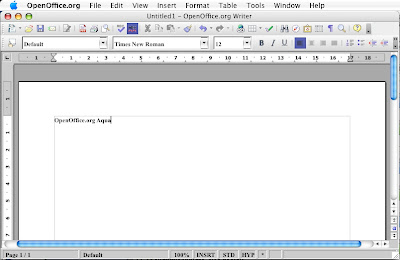
Today I thought I would give you a sneak peek at the upcoming OpenOffice.org Aqua. I have 2 quick screenshots for you.

First up is the OpenOffice.org Writer window after resizing, with a native Mac menu bar.

From OpenOffice.or...

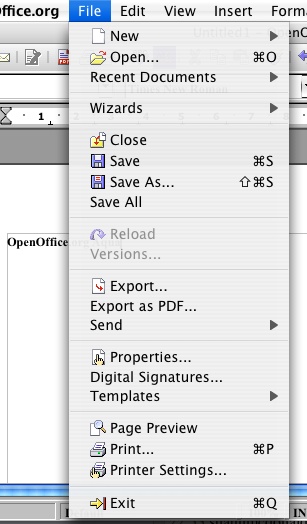
Second is a menu. You can currently use both cmd or ctrl to activate the menu command shortcuts. There is no native file picker yet, but it is a work in progress.

From OpenOffice.or...

Thursday, May 03, 2007

Sun officially supports the Mac port of OpenOffice.org

This morning I woke up to some great news. Sun now have 2 full time employees with many years of experience in programming StarOffice and OpenOffice.org.

Original Mail to the Mac Port list

Original Blog post

Saturday, March 31, 2007

OpenOffice.org Language Pack Revamp

As sent out to some of the OpenOffice.org mailing lists:


At the moment there are a number of issues with the current language packs for OpenOffice.org. Some platforms such as Mac OS X don't have language packs, instead they only have full installsets. The language packs currently have to be built on each platform individually. This means extra compilation time and extra storage on the mirror network since essentially the same localisation data is packaged into a different package for every platform.

I have a proposal for dramatically improving the current situation.

Let's have cross-platform language packs. This will mean that the language packs will be built once, and can then be used on ANY platform. This will save build time, especially when a builder can just use their fastest machine, instead of having to do it once per platform. This will free up developer and builder time, as well as space on the mirror network.

With this change I'm looking at implementing a simple user installation of language packs, similar to what has just been added to OpenOffice.org 2.2 for extensions. This would enable platform integration for the language pack installation. We could possibly go as far as Firefox and deploy language packs in a very similar way to extensions. We could even have the option to install language packs just for one user or for all users of the installation. If the platform supports it, a server deployed location for the language packs should be possible.

This is just an idea, it needs more development before implementation. No implementation testing has been done yet. An initial idea check for daftness has been completed, which is why this mail is going out. I'm looking to see if there are any foreseeable problems with this proposal, and whether there is backing from the whole OpenOffice.org community.
Comments are more than welcome.

Saturday, March 24, 2007

OpenOffice.org Mac Port timeline updated

Further to Eric Bachard's mention on his blog. I have now updated the time line for the Mac Port of OpenOffice.org and added a new news item for it.

We are currently looking at a May 2007 release for the Alpha of OpenOffice.org Aqua. Around the end of the year we hope to have a beta release of OpenOffice.org Aqua available.

Saturday, March 03, 2007

X11 Installation instructions now has pictures

I have added some pictures to the X11 Installation instructions on the OpenOffice.org Mac Porting Pages. This should make it easier for users to follow and understand.

Monday, February 26, 2007

OpenOffice.org 2.2 to Require Java 5 too

It looks like Java 5 and the latest software updates will be required if you want to use the next version of OpenOffice.org (2.2) on Mac OS X.

For more information please read a post to the users list by James Mckenzie.

Saturday, February 10, 2007

Frappr works on the Mac again

For a while it has been impossible to upload photos to Frappr maps using Mac OS X. The Frappr team have recently got it sorted out, so I can now add my updated photo the the current OpenOffice.org Mac OS X Porting Developers map.

Saturday, January 20, 2007

New Mac PPC Buildbot

There are now 3 Mac buildbots available for testing builds of OpenOffice.org.

The latest addition is by audionuma (or in real life known as Manuel Naudin) from Paris, France, who has donated the processor time of his PPC Mac. He gave a short introduction about himself at yesterday's Mac Port Meeting. His bot has the name MacPort3 on the buildbot master.

Saturday, December 23, 2006

Record Number of Locales Passed QA for OpenOffice.org 2.1 on the Mac

At this writing there are currently 3 locales passed QA and available to download, for OpenOffice.org 2.1 Mac OS X Intel and 5 for the PPC Macs. That gives a total of 6 unique locales that have been passed QA on both the PPC and Intel Mac platforms for OpenOffice.org 2.1. This is a record. Previously only English, German and French were put through their paces to check their functionality and links posted on the Mac Download pages. With the help of QATrack I'm able to find out which locales are being tested, and if they have been distributed to the mirrors.
There are still more currently being tested.
Download OpenOffice for the Mac

Monday, December 04, 2006

2nd Mac Porters Meeting

I made the whirlwind trip to Hamburg for the 2nd Mac Porters Meeting at the Google offices there. I seem to have survived my first flying trip (in both senses). It was great to meet the porters in person again or for the first time.

I really liked the Eurostar on my Lyon trip, far smoother in parts, though longer. You can also move around a lot more on the Eurostar and have no seat belts too. Now all we need is for a high speed rail link between Edinburgh and London that make the Eurostar even better.

It was great being able to play with a Mac Pro! Even without ccache installed, a build of OpenOffice.org takes about 1 hour and 20 minutes. This is dramatically less than the current build times that I'm getting on my MacBook, of around 8 hours. Now I really want one, but simply cannot afford it. :-(

It is also quite nice to have a shot of working with 2 monitors with my MacBook. It is a lot better to be able to work with different part of a project on different screens. For example, the source code on one and the result on the other screen. However I'm trying to put off getting a monitor until I have a job or can afford it.

With the help of Oliver Braun, I managed to get the link to the Applications folder inside the disk image working properly. I was very close to getting the line of make file in the correct place. We're looking at possibly increasing the size of the background image to make it look a bit better. Follow issue 72008 to track the integration and testing of my patches.

Minutes of the events on Saturday are available on Eric Bachard's blog. Sunday's events should be coming soon. EDIT: The events from Sunday are available.

I have to thank Martin Kretzschmar for his sofa, otherwise I would never have gone.

Friday, November 10, 2006

Support for Mac OS X 10.3 to be dropped after OpenOffice.org 2.1

As was discussed in tonight's Mac Port Meeting for OpenOffice.org, the Mac Porting Team will be dropping support for Mac OS X 10.3.x after the release of OpenOffice.org 2.1.
The reasons for the dropping of support of Mac OS X 10.3 include:

  • Around the time OpenOffice.org 2.2 is due out, Mac OS X 10.5 will be released some time in "Spring 2007"[1]. Trying to support 3 Major versions of Mac OS X is difficult with our small team.
  • The current Aqua development versions of OpenOffice.org require the use of Mac OS X 10.4 or later.
  • The Mac Porting Team has limited resources and very few developers currently have access to a machine that has Mac OS X 10.3 on it. This means that developing and testing on Mac OS X 10.3 is difficult.
  • [Only for the technical minded] The compiler (gcc3) that is used for producing builds for Mac OS X 10.3 isn't good enough any more. Examples for problems include: It claims valid code isn't valid; doesn't give useful error or warning messages; and some warning messages are not available. The gcc4 (the compiler in Mac OS X 10.4), is much better as it doesn't have the aforementioned problems.

If it is shown that there is a large requirement for continuing future support for Mac OS X 10.3, then this decision may be reversed.
The log of the meeting is available to read.

[1]: Source Mac OS X Leopard Sneak Peek Page

Friday, October 13, 2006

OpenOffice.org 2.0.4 for Mac OS X released

OpenOffice.org for Mac OS X (X Windowing) has been released publicly.

I updated the web pages earlier to day. It should be noted that there currently is no tested German version, as no one has tested it yet. I have made a number of other changes to the web pages that have been in the pipeline for quite some time now. This includes the introduction of the new home page for the Mac Port. Some other pages have been updated as well, to include the new border, which has been missing on some of the new pages.

Saturday, September 09, 2006

Updated OpenOffice Mac Download Pages

Ahead of the OpenOffice.org conference, I have just released the new download pages for OpenOffice.org (X11) on the Mac. They are now much simpler than before. The download is now available at http://porting.openoffice.org/mac/download/. The old download pages (except the legacy download for 1.1.2) redirect to the new pages.

Part of this is the fact that there is no longer a big long list of mirrors to choose from. This is because I have used the OpenOffice download bouncer for all the downloads in the OpenOffice.org download servers. If anyone else needs to update the pages in the future, you will need to speak to cloph on IRC, who is able to update the bouncer with the new files.

I'd like to thank Fipa for his design, and James McKenzie on the mac@porting.openoffice.org list for his feedback.

There are more updates to come to the OpenOffice Mac Porting site before the end of the month, thereafter updates to the site will slow down.

I'm waiting on fink compiling quanta, which is the editor that Fipa used to create the pages, so hopefully I'll find it easier to keep the site up to date with the new design. I hope that it will be better than the more than a year old Nvu, even if I have to use X11.

Friday, September 08, 2006

OpenOffice.org for Mac OS X Aqua Roadmap

The Mac OS X Porting Team have released a roadmap of their development of the Aqua version of OpenOffice.org without the need for X11.

read more | digg story

Wednesday, September 06, 2006

The all new Google News Archive Search

The new Google Archive Search is a great tool, with even more potential.

The timeline feature is really neat, though could be more customisable. For example being able to show more articles on one page.

Here's and example search for all articles related to Mac OpenOffice in timeline form.