Showing posts with label Aqua. Show all posts

Thursday, March 27, 2008

OpenOffice.org 2.4 on Mac OS X [Update: now available]

The release of OpenOffice.org 2.4 (X11 version) is a little behind the other platforms due to a lack of resources in the QA process, as many of the resources have been placed on the upcoming aqua version. It will be another few days to week before they are available on the mirrors and the Mac Port download pages will be updated at that point.


Until then the new smart download pages will continue to give the link to the 2.4.0 build which isn't yet available.

UPDATE: OpenOffice.org X11 2.4.0 for both Mac OS X 10.4/10.5 PPC and Intel are now available from the Mac Porting Download pages.

Wednesday, March 19, 2008

New OpenOffice.org Aqua Development Release

Head over to the OpenOffice.org Mac Porting web site for the latest development build.


This is the most stable build of OpenOffice.org running natively on Mac OS X that I have seen. I haven't yet had a crash with my basic usage. Mac OS X 10.4 or 10.5 is required.

The improvements include:
  • Printing now uses an aqua native print dialog
  • Various bugs, crashes, performance, and cosmetic improvements
  • The native file picker should work now (though there are 2 unlabeled checkboxes)
  • The QuickStarter is now supported on Mac OS X
  • Copy and Paste now works in the Hyperlink dialog
  • Icons are no longer shown in the menus by default on Mac OS X
  • Extentions can now be installed through the GUI
  • Improved scrolling when using a scroll wheel
  • Real version number is shown in the Mac OS X Finder's Get Info Window.
  • The recent items list in the Apple menu is now populated
  • Faster loading and saving of files
  • New Start Centre
The downloads are on the extended mirror network, and BitTorrent. Please don'tdirectly link to any of the mirrors, please link to the OpenOffice.org Aqua download page instead.

OpenOffice.org 2.4 (X11), is currently in testing. OpenOffice.org 3.0 will be Aqua only.

Sunday, December 30, 2007

iLife Browser in Leopard's open dialogs

In Leopard, if the developer allows certain types of file to be opened, then you get a free iLife browser in the file open dialog. This applies to OpenOffice.org aqua on Leopard too. As the X11 version of OpenOffice.org doesn't have a native filepicker, this won't be available there.

Find a screenshot below.

 
Those who have played with the latest OpenOffice.org aqua builds, you will find that you get an open dialog like the above one, without any way to select any files. This is a known bug. You simply cancel and open the dialog again to workaround the issue, until the fix is found and integrated.

Friday, December 07, 2007

Mac OS X OpenOffice.org file naming scheme

Bruce has mentioned that he didn't understand the files on the good-day server in a comment to a prior blog post.


I'll try to make this as simple as possible for end users to understand using the following example:
OOo_SRC680_m237_MacOSXIntel_AQUA_install_en-US.dmg
This can be broken down into several smaller chunks _ is used as a separator:
OOo is the short product name. Other options are BrOo (the Brazilian localisation of OpenOffice.org due to
SRC680 is the code line, this changes with every major release. All release candidates are done on a different code line. For example OpenOffice.org 2.3.x used OOG680.
m237 is the milestone. OpenOffice.org code base has a new milestone every few weeks (sometimes a milestone will have only a few days between but this is rare). This number increases after several new code change have been integrated into the trunk of the code line. Internally within OpenOffice.org this is a MWS or Master WorkSpace.*
MacOSXIntel tells you the Operating System and the Platform that this build is for. Another option relevant to mac users is MacOSXPPC or MacOSXPowerPC. The name is changing/has changed to come in line with other platforms.
AQUA states that this is an AQUA build. The other option is X11. This option is only there during the transition from X11 to Aqua. It will be soon be the case that this parameter won't be included when Aqua is default.
install is there to say that this is an application and not a language pack, SDK or URE. The SDK and URE are generally only needed by developers. Language packs are currently not available for Mac OS X.
en-US this is the language that is to be installed.

* In OpenOffice.org we use a trunk and branch method. Think of a tree growing. Any new code is created in a branch (internally called a CWS), which is merged back into the trunk when it is ready. Think of the milestones being the rings you see when you cut a tree down. However we are producing these rings (milestones) far more frequently than a tree in nature.

Tuesday, July 03, 2007

OpenOffice.org Aqua 2nd Preview Released

The second OpenOffice.org Aqua Preview is now available for download.


There are a number of new features and bug fixes in this release. There is one major known regression, that will be fixed in a future development build. This time we have not hacked the source to include the Mac OS X native file picker. Instead there is the OpenOffice.org file picker used.

For the record the new things in this version include:
  • Printing now works, though it does not yet use an aqua print dialog
  • PDF export now works
  • Copy and Paste should now work fully
  • OpenOffice.org no longer crashes after quiting
  • Text and graphics are now drawn properly
  • Windows and dialogs mostly now have an aqua theme
  • Combo boxes now look a lot better
  • Various bugs, crashes and performance improvements
  • (QA only) testtool can be hacked to work properly
There are a number of things that do not work in this version. Please do not report anything in the following list, as reporting known issues, just wastes developers time. The known issues currently include:
  • There is a black flash when opening new windows
  • OpenOffice.org still has problems with Aqua's device resolution indepence
  • There is no Aqua file picker in this release. This is a known regression, the Aqua file picker will be back in a future build
  • Opening a document to open in OpenOffice.org from another application, such as the Finder, Mail or Safari, will mean that OpenOffice.org will open with a blank document. You need to open all documents from within OpenOffice.org
  • The print dialog is not the same as one in other Mac OS X Applications
  • Starting OpenOffice.org from a shared/remote folder does not work
  • Impress will not recognise multiple monitors for presentations
The list on the aqua download page will be updated with more known issues as required.

Thursday, June 07, 2007

OpenOffice.org Aqua's first in depth review

The first in depth review of OpenOffice.org Aqua that I have come across is by Greg Kefalas. This is a four part series starting today, so more information in the coming days. I'll add links to the other parts of the review as they become available.

Part one

Part two
Part three
Many of the problems mentioned are already fixed, or will be fixed for the next developer preview. Also the new chart, which is coming in OpenOffice.org 2.3 will be there too.
Part four Some of the issues raised have already been fixed and will be in the next developer snapshot. Having separate application for Writer, Calc, Impress etc. takes a lot of work to redesign the way ooo works otherwise it would have been implemented by now. The first steps in the project is to simply use native controls and get the most important features of Mac OS X implemented. We will then make a stable release. Thereafter we will look into other things like Applescript and re-organising the menus of OpenOffice.org into palettes. However if someone with a special passion for implementing Applescript support into applications comes along today and that's all they want to do, we won't stop them, if they are following our coding guidelines.

Tuesday, June 05, 2007

First OpenOffice.org Aqua snapshot released

The first development snapshot of OpenOffice.org Aqua has been released into the wild. There is still a lot of work to do, and there has been some progress already since the snapshot was produced.

This snapshot can be downloaded from the OpenOffice.org Aqua Mac Download page

There are a number of things that still don't work, including printing, exporting to a PDF, copy and paste, drag and drop, and multiple monitors.

There will be some more snapshots in the near future.

Saturday, May 19, 2007

Carbon Apps produce preference files without developers doing anything

This evening I was speaking to Yvan Barthélemy (ybart on IRC) over IRC, when he pointed out something interesting about the preferences for the Aqua port.

Even so the aqua port hasn't specifically done anything to do so, Mac OS X has created the preferences file org.openoffice.script.plist. This contains information such as the last used folder in file open dialogs, and any other Carbon components that have preferences associated with them.

The preferences filename comes from CFBundleIdentifier in the Info.plist file that is in every Application bundle. We came to the conclusion that this isn't a good name for the aqua version. We thought that having a CFBundleIdentifier of org.openoffice would be appropriate since OpenOffice.org doesn't have any other applications of the Mac. (Well as far as I know at the moment).

Saturday, May 05, 2007

OpenOffice.org Aqua screenshots

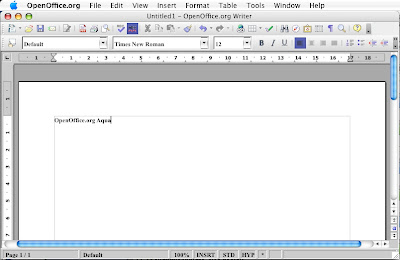
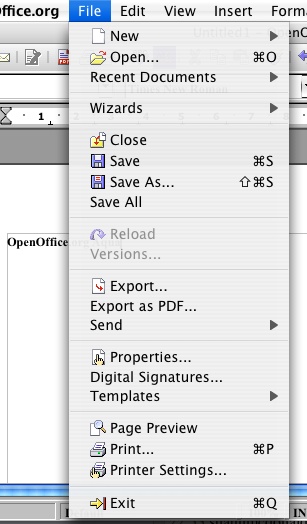
Today I thought I would give you a sneak peek at the upcoming OpenOffice.org Aqua. I have 2 quick screenshots for you.

First up is the OpenOffice.org Writer window after resizing, with a native Mac menu bar.

From OpenOffice.or...

Second is a menu. You can currently use both cmd or ctrl to activate the menu command shortcuts. There is no native file picker yet, but it is a work in progress.

From OpenOffice.or...

Saturday, April 28, 2007

Acceptability of applications to Mac users

There has been some online commentary recently on the likely acceptability of applications on the Mac platform. It basically boils down to: all applications that are successful on the Mac are well designed. They all look and behave the same way. Mac users are very fussy about the way that applications look and run. If they are not happy then they will not use the application, they will find an alternative application.
This basically means that OpenOffice.org for the Mac will have to be different from the main OpenOffice.org in a number of respects. Some of these could be integrated as an option for other platform.
Examples that could be used across all platforms include:

  • using palettes instead of dialog boxes for things like the paragraph and character dialogs
  • using native colour chooser dialogs
  • full document indexing/searching (partly implemented already)
  • system address book access
  • Mozilla plugin that doesn't require a full OpenOffice.org installation to work
  • quick view (in various incarnations)
Examples of integration specific to the Mac platform (I don't know if these are available on other platforms):
  • iLife integration
  • .Mac integration
  • Backup integration
  • (Leopard only) iChat for collaboration with documents and sharing presentations
  • (Leopard only) System-wide ToDo integration
If anyone has any other ideas or comments, please add your comments to this blog post.

Example articles:
Why VRML Failed and What That Means for OpenOffice
All I want for Christmas...

Saturday, March 24, 2007

OpenOffice.org Mac Port timeline updated

Further to Eric Bachard's mention on his blog. I have now updated the time line for the Mac Port of OpenOffice.org and added a new news item for it.

We are currently looking at a May 2007 release for the Alpha of OpenOffice.org Aqua. Around the end of the year we hope to have a beta release of OpenOffice.org Aqua available.

Friday, November 10, 2006

Support for Mac OS X 10.3 to be dropped after OpenOffice.org 2.1

As was discussed in tonight's Mac Port Meeting for OpenOffice.org, the Mac Porting Team will be dropping support for Mac OS X 10.3.x after the release of OpenOffice.org 2.1.
The reasons for the dropping of support of Mac OS X 10.3 include:

  • Around the time OpenOffice.org 2.2 is due out, Mac OS X 10.5 will be released some time in "Spring 2007"[1]. Trying to support 3 Major versions of Mac OS X is difficult with our small team.
  • The current Aqua development versions of OpenOffice.org require the use of Mac OS X 10.4 or later.
  • The Mac Porting Team has limited resources and very few developers currently have access to a machine that has Mac OS X 10.3 on it. This means that developing and testing on Mac OS X 10.3 is difficult.
  • [Only for the technical minded] The compiler (gcc3) that is used for producing builds for Mac OS X 10.3 isn't good enough any more. Examples for problems include: It claims valid code isn't valid; doesn't give useful error or warning messages; and some warning messages are not available. The gcc4 (the compiler in Mac OS X 10.4), is much better as it doesn't have the aforementioned problems.

If it is shown that there is a large requirement for continuing future support for Mac OS X 10.3, then this decision may be reversed.
The log of the meeting is available to read.

[1]: Source Mac OS X Leopard Sneak Peek Page

Thursday, August 31, 2006

OpenOffice Aqua picked up wrong

It would appear that many news organisations have picked up on the OpenOffice Aqua news wrongly. OpenOffice are only going to preview the latest Aqua build at the OpenOffice conference and Apple Expo in Paris, next month.

Pages that have picked up on the story and claim that the OpenOffice Mac Porting Team are going to release an Aqua version of OpenOffice next month include:

http://www.macfixit.com/article.php?story=20060830085917126

http://www.macworld.co.uk/news/index.cfm?NewsID=15712&Page=1&pagePos=2

http://macslash.org/article.pl?sid=06/08/31/0111246


Well you never know a miracle may occur and that will happen, though the current estimate is 6-12 months for a final version of OpenOffice in Aqua to be release by the OpenOffice.org Mac Porting Team.

Saturday, August 26, 2006

OpenOffice Aqua is coming along nicely

I've been playing around with one of Eric Bachard's recent Intel OpenOffice Aqua builds. Although it crashes a lot, it does work to some degree.

The crash reporter has a crashing bug in it so I had to disable it using the startup switch -norestore.

Eric had said to me not to run the registration wizard by using the startup switch -nofirststartwizard. However, it worked every time for me, apart from being slow.

There are also two environment variables that need to be set to be able to use the native menus or widgets. These are:

export AQUA_NATIVE_CONTROLS=TRUE

export AQUA_NATIVE_MENUS=TRUE

It won't be until early 2007 that we there will be an alpha build available of OpenOffice running on the Mac without X11. Until then, you have OpenOffice running within X11. It is available to download from http://porting.openoffice.org/mac/ooo-osx_downloads.html.